My first Fiverr profile picture was a selfie taken in bad lighting with a half-visible ceiling fan in the background. My gig title said “I will do graphic design for you” — like I was the only person on Fiverr offering that. Three weeks, zero orders, and one very confused message from a potential client asking if I was “actually a real business or a student doing this for fun.”
That message stung a little, but it was also the wake-up call I needed. I ended up spending an entire weekend rebuilding my profile from scratch — new photo, rewritten description, better gig images, the whole thing. Within ten days of that rebuild, I got my first order. Not because Fiverr’s algorithm suddenly loved me, but because my profile finally looked like something a stranger could trust with their money.
If you’re setting up your Fiverr profile right now, let me walk you through exactly what I’d do differently if I were starting today, mistakes included.
Why Your Profile Matters More Than You Think
A lot of beginners treat the profile as a formality — something you rush through so you can get to the “real” part, which is creating gigs. That’s backwards. Your profile is often the first thing a client checks after clicking into your gig, especially for anything above $20-30. If it looks unfinished or generic, they bounce, no matter how good your gig description is.
Think of it like a shop window. Your gig is the item on the shelf, but your profile is the storefront that makes someone want to walk in.
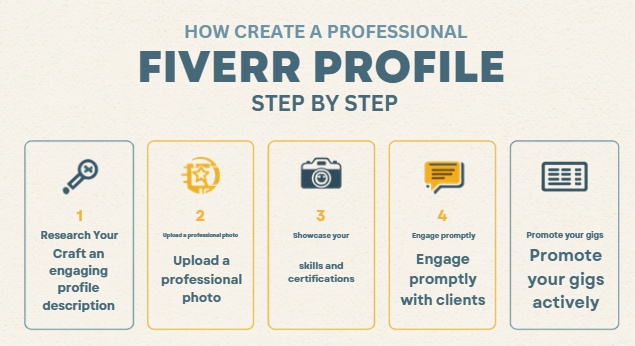
Step 1: Choose a Profile Photo That Actually Builds Trust
This sounds basic, but it’s where most beginners lose points immediately. No sunglasses, no group photo cropped awkwardly, no random anime avatar (I made that mistake too, briefly, thinking it looked “creative”).
What worked for me: a simple, well-lit photo, front-facing, plain background, decent smile, nothing distracting. You don’t need a professional photographer — natural daylight near a window did the job for me. Clients aren’t judging your photography skills here, they just want to see a real, approachable human being.
Step 2: Write a Username That’s Actually Usable
I originally used a gamer-tag style username I’d had since 2016. It didn’t relate to my work at all and honestly looked unprofessional next to sellers with clean, simple names. If your real name’s variations are available, use that. If not, keep it simple and closely tied to your niche — something a client could actually remember or search for later.
Step 3: Craft Your Profile Description (This Is Where Most People Go Wrong)
My first description was three lines long: “I am hardworking. I deliver on time. I love design.” Generic, forgettable, and honestly, every single competitor was writing some version of the same three lines.
Here’s the structure that actually worked once I rewrote mine:
- Open with what you do and who you help — specific, not vague. “I design clean, modern logos for small businesses and startups” beats “I do graphic design” every time.
- Mention relevant experience or background, even if it’s not decades long. If you’ve done freelance work outside Fiverr, college projects, or personal projects, mention them honestly.
- Add a personal touch — one line about your work style or what clients can expect when working with you. This is the part that makes you sound human instead of copy-pasted.
- End with a soft call-to-action — something like inviting them to message you with project details before ordering.
Keep the whole thing under 150-200 words. Clients skim, they don’t read a full essay about your life story on a Fiverr profile.
Step 4: Fill Out Your Skills and Languages Honestly
I once added “video editing” to my skills list even though I’d only casually used CapCut a handful of times. A client actually messaged me about a video project because of that listed skill, and I had to awkwardly explain I wasn’t really equipped for it. Lesson learned — only list what you can genuinely deliver on, because Fiverr does use these tags to match you with relevant buyer searches.
Language proficiency matters too, especially English. Be honest about your level, but also make sure your written communication throughout the platform backs up whatever you claim.
Step 5: Add Certifications or Test Scores (If You Have Any)
Fiverr has skill tests you can take for free, covering things like English, WordPress, SEO, and more. I took the English test mainly out of curiosity, and having that badge visible on my profile genuinely seemed to increase trust — a couple of early clients specifically mentioned noticing it.
You don’t need a stack of certifications, but even one or two relevant ones add credibility, especially when you’re brand new and have zero reviews yet.
Step 6: Set Up Your Profile Video (Optional, But Underrated)
I put this off for almost four months because I felt awkward recording myself. When I finally added a simple 30-second intro video — just me explaining what I do and who I help, filmed on my phone — my profile views noticeably increased. Fiverr also seems to favor profiles with video slightly higher in visibility, though I can’t say that with total certainty since Fiverr doesn’t publish exact algorithm details.
It doesn’t need production value. Clear audio and decent lighting are enough.
Step 7: Connect Your Portfolio and Social Proof
If you have work samples outside Fiverr — a personal website, Behance, GitHub, whatever fits your niche — link it. I added my small portfolio website, and more than once, clients mentioned they’d checked it before messaging me, which helped skip a lot of the “can you prove you can do this” back-and-forth in early conversations.
Common Mistakes to Avoid (Beyond What I Already Mentioned)
Copying another seller’s profile description almost word for word. I did this once early on, and honestly, it just made my profile blend into a sea of identical-sounding sellers. Original, even if slightly rough, beats polished-but-copied.
Leaving the profile incomplete “for now.” Half-filled profiles look abandoned, and clients notice missing sections immediately.
Overselling with buzzwords like “expert” or “guru” with zero portfolio to back it up. It creates a mismatch the moment a client actually sees your work, and mismatched expectations lead to bad reviews.
Ignoring profile updates after you improve. I kept my original weak description live for almost two months after I’d genuinely improved as a designer, purely out of laziness. Your profile should grow alongside your actual skill level.
Not proofreading. Small typos in your description make a bigger dent in trust than people expect, especially since a chunk of Fiverr buyers are checking for basic communication competence before they even message you.
A Quick Real Example
A friend of mine selling social media management services had almost the same profile struggle. Her original bio read like a resume — bullet points, no personality, very stiff. After rewriting it in a more conversational tone and adding two real case studies from actual client work (with permission), she went from occasional inquiries to a fairly steady stream of messages within about three weeks. Nothing else about her gigs changed — same pricing, same services. The profile alone shifted how seriously people took her.
Final Thoughts
Your Fiverr profile isn’t just a formality standing between you and your first gig — it’s genuinely doing a lot of the trust-building work before a client even reads your gig description. Take the extra hour or two to get it right instead of rushing straight to publishing gigs, because a weak profile quietly undermines even your best work.
I still cringe thinking about that ceiling-fan selfie sometimes, but I’m also glad it pushed me to actually take this part seriously. Get your photo, your description, and your honesty about skills sorted first — everything else on Fiverr gets noticeably easier once that foundation is solid.